The calculation window will give you the possibility to display measurement data as single values with a large font. It is required to have Analyze mode to enable this window.
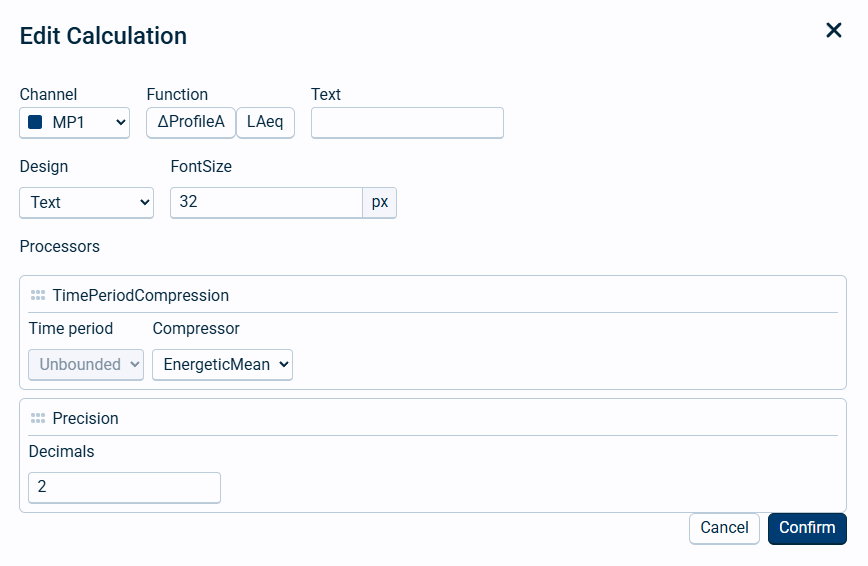
Edit calculation window
Field name |
Optional / Required |
Data in field |
Information |
|---|---|---|---|
Channel |
Required |
One specific channel |
This is the instrument channel to get data from. |
Function |
Required |
Profile and function |
Profiles and functions are defined in the sound setup and by the type of view described above. Keep in mind that the graph cannot update faster than the time profile selected. |
Text |
Optional |
Text |
If left empty, NorCloud will automatically give a label depending on the profile selected. I.e. profileA LAeq will be named LAeq, profileB LAeq will be named PBLAeq, global LAeq will be named GLAeq and moving LAeq will be named PMLAeq. |
Design |
Required |
|
Choose between Text and vertical gauge. |
FontSize |
Optional |
Number |
Only for Text design. This is the font size for the text to be displayed. |
Min and Max |
Optional |
Numbers |
Only for vertical gauge design. This is the minimum and maximum set for the vertical gauge. |
Processors |
Required |
Varies |
See descriptions below. |
Processors
Time period processor
Here you can calculate a value within the selected time period in the dashboard.
•Time period defines the time period to be evaluated. For now, only Unbounded is possible to select, which means the entire time period selected.
•Compressor defines the type of compressor to be used. For now you can select the following:
oLast value, meaning the last value that has appeared in the measurement time period selected. If time period is today and new data arrives, normally either every minute or every hour, it will update with the latest value.
oEnergetic mean, this calculates an energetic mean for the measurement time period selected.
oMax and Min, this is the maximum or minimum value for the measurement time period selected.
Precision
This is the number of decimals for the number to be displayed, default value is two decimals.