The microphone check (or SysCheck) is a daily verification of the electrical properties of the microphone system.
Some theory
The microphone check is a verification of the cartridge capacitance. The cartridge capacitance varies from one microphone to another, similar as the microphone sensitivity. The sound level meter Nor145 or Nor150 sends a fixed signal at 1000Hz to the microphone and compare the measured value against a reference value stored in the instrument. The reference value is typically between 89 to 92 dB. The important factor is that this value should not deviate more than the allowed tolerance level. The tolerance level can be set between 0,5 to 5 dB. Recommended is 0,7dB.
How is the microphone check on the Nor145/150 compared to an acoustic test?
The microphone check is a good alternative to an acoustic test. It will detect fault in the cable, preamplifier and to some extent fault in the microphone. Ingress of water or water above the membrane will be detected. Syscheck is basically an electrical check where the microphone cartridge capacitance is a part of the signal chain. Thus, any change in microphone capacitance (typically 15-18 pF for a ½” capsule) will be detected as a deviation from the nominal value. However, there are a few limitations that needs to be considered:
•On 200V polarized systems it will not detect a change in the polarization voltage such as Nor1225.
•It will not detect if the microphone changes sensitivity due to change in the polarized electret in a self-polarized microphone, such as Nor1227, 1228 or 1239.
•Pin holes in the diaphragm resulting in change in the low frequency response, but this is not normally detected by an acoustical calibrator either.
On an unattended monitoring system, it is not likely that the microphone will be mechanical damaged. The biggest challenge is ingress of water which will be detected.
How is it implemented in NorCloud and Nor145/150?
Microphone check is performed every night at 0300 if it is enabled in NorCloud. It can be enabled and setup when editing a sensor. Calibration frequency is 1000Hz. Measured parameters are LAeq and LAFmax, global only.
The procedure takes less than one minute and will appear as a gap in the continuous L/t data. It is a separate file and will not be a part of the overall measurement.
How to set up microphone check at the instrument
The procedure for using the microphone check on the instrument is as follows:
1.Perform a normal calibration of the entire instrument by use of an external acoustical calibrator to establish a "reference level".
2.Remove the calibrator from the instrument.
3.On the instrument, press CAL > Mic. Check to open the mic. check menu. Place the cursor on the 1 kHz bar and read the level. The level will depend on the actual previous sensitivity calibration as well as the individual preamplifier and microphone in use. Do not adjust the sensitivity as it should already be set in number 1 above.
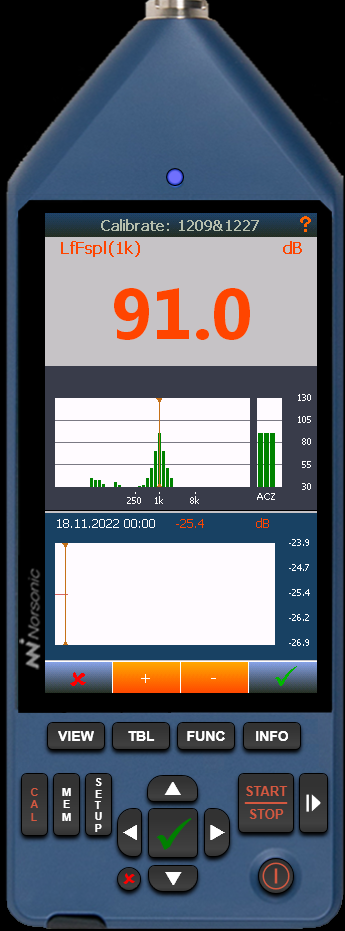
Instrument microphone check
4.Read the level displayed, in this example it's 91,0 dB.
How to set up microphone check in NorCloud
The Reference level and Tolerance is set from the  Edit Sensor menu. You must enable Transducer check to get access to these two settings:

Click the  microphone check in the sound sensor main page on the left side to view the status log of the microphone checks:

List of microphone checks
Explanation of the microphone check procedure
Procedure starts
•Measure background noise. 15 sec measurement. Parameter LAeq 15 sec and LAFmax
•Turn on mic check
•Wait 15 seconds
•Measure mic check level. 15 sec measurement. Parameter LAeq 15 sec and LAFmax
•Turn off mic check signal
•Wait 5 sec
•Start normal measurement
Procedure finish
The Validation of the microphone check is as follow;
1.If ref. level – LAeq background < 12 dB then validator is false due to too high background noise which may result in a too high measured value.
2.If LAFmax mic check -LAeq mic check is > 1 dB then validator is false due to impulsive noise during the calibration process which may result in a too high calibration level.
3.If validator is true the following is checked;
4.If LAeq mic check – reflevel > +- tolerance then mic check is false.
5.If LAeq mic check – reflevel < +- tolerance then mic check is true / passed.
A system alarm may be generated if the microphone check fails. This is enabled in the Systems Alarm menu.
The Mic Check feature requires instrument application version 3.0.2107 or newer.