Here you can set up periods, corrections and alarms for calculating Partial LAeq values. Partial LAeq is a equivalent value filtered by the settings given in the setup. Filtering can be performed by:
•A noise compass sector
•NoiseTag labels
•Weather conditions
Click on the  icon in the left menu to open the Special functions menu item, then select Partial LAeq setup:
Partial LAeq profile hour (from Noise compass)
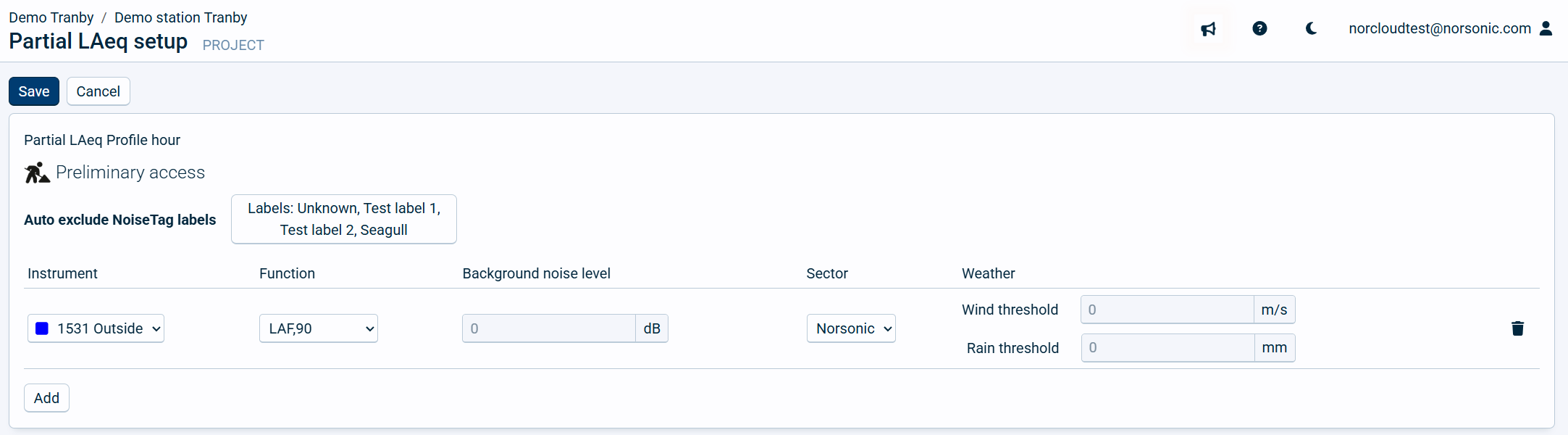
Here you can set up an hourly LAeq value which has values removed or reduced by the Noise compass settings if it is pointing in another direction than selected with a higher quality parameter than required. This value will always be lower than the measured LAeq unless the ExcludeNoValues setting is enabled. Then it could possibly be higher, but the profile time will no longer be one hour. Partial LAeq requires that profileA LAeq is enabled and uploading to NorCloud and NoiseTag or weather station or a Noise compass is enabled.
Partial LAeq is by default represented in the graph as PaHLAeq.
The following settings are available under Partial LAeq:
Field name |
Optional / Required |
Data in field |
Information |
|---|---|---|---|
Sensor |
Required |
Text |
Choose from one of the sensors with Noise compass enabled. |
Sector |
Required |
Selection of sector |
Choose what sector to keep values from. All values pointing in this direction, regardless of quality is kept for calculating partial LAeq. |
Function |
Required |
ExcludeNoValues, FixedValue or Statistics |
Select what to do if the noise compass is not pointing in the selected sector direction and it is above the given quality requirement for the other sectors in any samples during the evaluated profile hour. ExcludeNoValues: These values are removed from the calculation, hence the duration of the noise compass measurement data will not be the same in between them, meaning they are not directly comparable. FixedValue, select a fixed value in the BGNSector setting. Statistics: These are statistical values from the sound setup. E.g., LAF,90% or LAF,50%. |
Background noise level |
Required |
Number |
This is the number the FixedValue is set to. BGN = Background noise. |
Weather |
Optional |
Wind speed m/s and/or rain threshold in mm |
If the value from the weather station is higher than its given threshold, the measured value is modified. |
These settings will not override the Noise compass trigger settings. It is possible to have the partial LAeq use a different sector than the trigger used on Moving and/or profileB.
Calculation of Partial LAeq from Noise compass
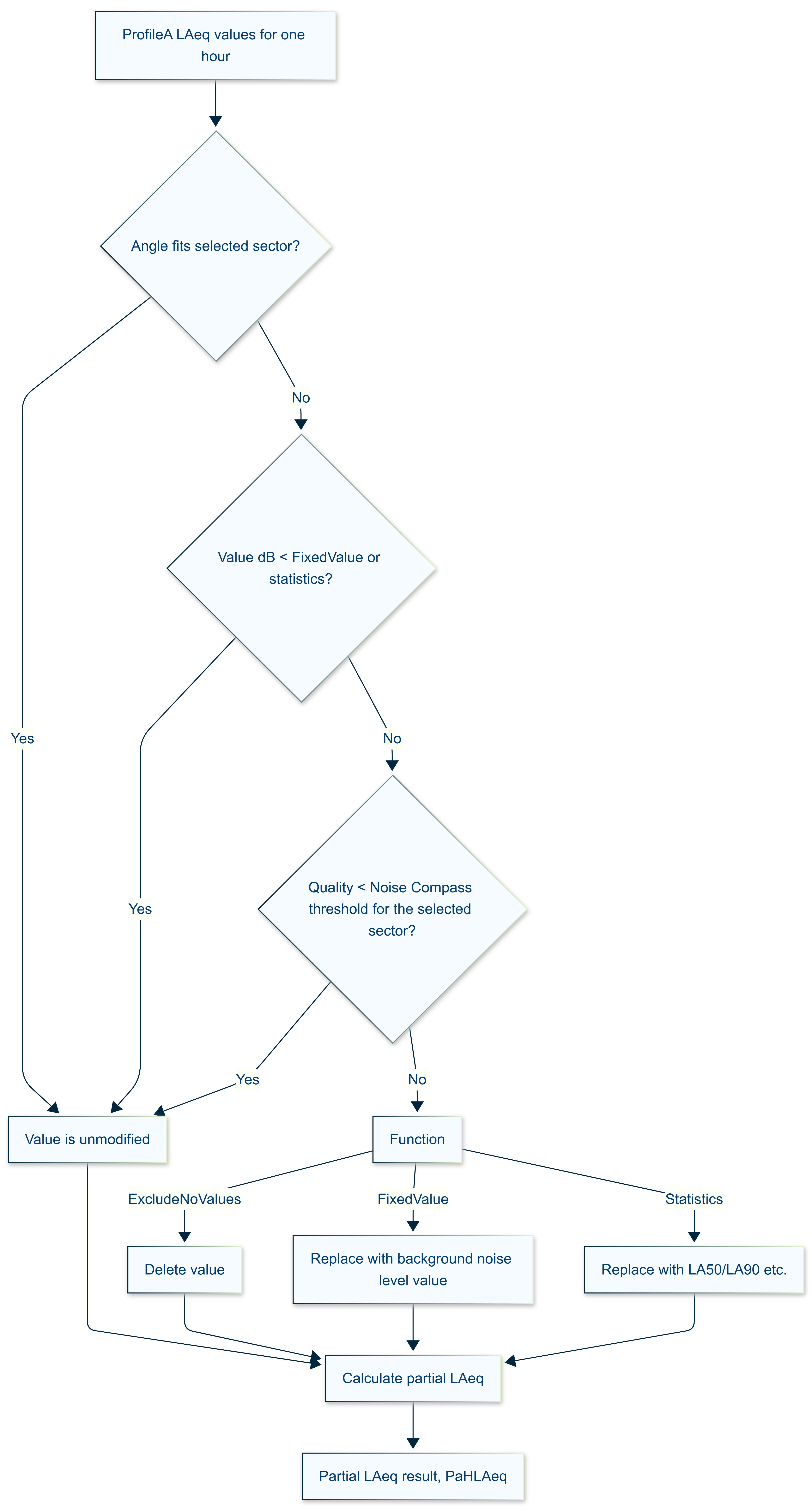
Partial LAeq is based on a collection of profileA LAeq values. Each value is evaluated based on the following criterias:
•If the angle fits within the selected sector, the value is unmodified.
•If the value in dB is lower than the FixedValue (or statistics), the original value is unmodified. That way, Partial LAeq for one hour will always be equal or lower than the measured hour unless values are set to be deleted.
•If the angle does not fit (including within an undefined sector) within the selected sector and the quality value is lower than given in the noise compass setting, the value is unmodified.
•If the angle does not fit (including within an undefined sector) within the selected sector and the quality value is higher than given in the noise compass setting, the value is set to 20 dB in this example.
If the criterias for modifying is met, then the value is deleted (ExcludeNoValues), set to a fixed value or set to statistics, e.g., LA50%.
Use the  icon to delete each single line setup.
Click “Save” to store the input. “Cancel” will exit without saving.