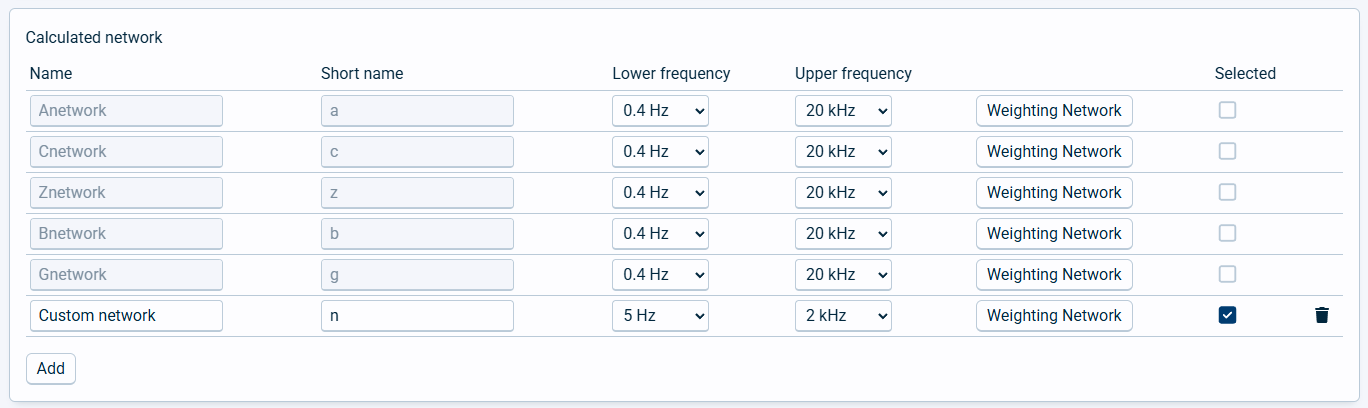
Here you can set up custom filters to use with the instrument. These flters are calculated from the 1/1 or 1/3 octave band flters and are dependent on the selected frequency range. Predefned calculated networks include: A, B, C, G, and Z.
Field name |
Optional / Required |
Data in field |
Information |
|---|---|---|---|
Name |
Required |
Text |
This is the full name for the network. |
Short name |
Required |
one character |
This is the short name to use for the network. The predefined networks are denoted with a small letter instead of a capital letter for the normal networks. |
Lower frequency |
Required |
Frequency number |
|
Upper frequency |
Required |
Frequency number |
|
Weighting Network |
Required |
Correction numbers |
Click this button to open the possibility to set the correction numbers for each 1/1 or 1/3 octave band frequency. You may also inspect the correction numbers for the predefined networks, but not edit them. |
Selected |
Optional |
Checkbox |
Click on this to select the current calculated network to use for the instrument. Remember to save the sound setup as well after selecting. |
Users can also defne custom weighting flters. Press the Add button at the bottom to add a custom network, fill in names and select the lower and upper frequencies. Remember to also fill in the data for the Weighting Network.
Only one calculated network can be selected at the time.