Clicking on the  Report icon -> EditTransferSites takes you to the transfer site setup. From here you can set up a site to where measurement data are uploaded.
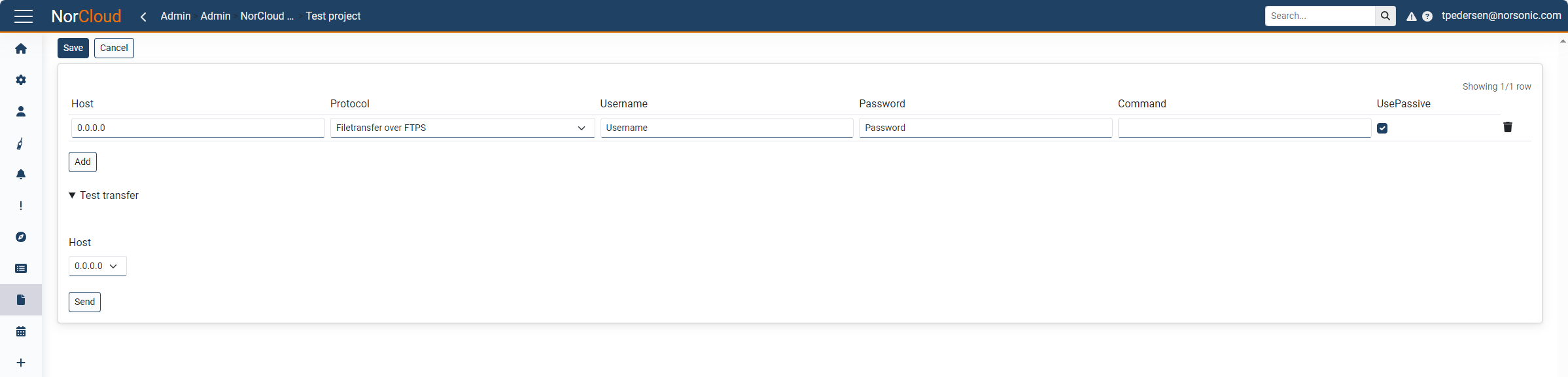
Each row represents a site. The following fields can be set up:
Field name |
Optional / Required |
Data in field |
Information |
|---|---|---|---|
Host |
Required |
Numbers separated by . |
|
Protocol |
Required |
Streaming over HTTPs, Filetransfer over HTTPs, Filetransfer over FTPS, Filetransfer over FTP |
Chose between streaming and filetransfer. Supported protocols are HTTPS, FTPS and FTP. The upload frequency is every minute for streaming and every minute for file transfers. |
Username |
Required |
String |
|
Password |
Required |
String |
|
Command |
Optional |
String |
|
UsePassive |
Required |
Checked or unchecked |
This applies to FTP/FTPS only. Use passive when FTP server is behind a NAT router. This is default. |
A site is stored at customer level and will automatically be shared among the projects belonging to that customer. That means adding or changing a site will be done for all projects. So if you use the transfer site in one project and change it from there, the same transfer site used in other projects will also be changed.
When using FTP, please keep in mind the following:
- Default port 21 is used for sending FTP commands.
- Other ports, e.g., port 20 or a higher numbered port range, might be used for data transfer. This is set up at the FTP server.
- Please ensure that all the ports used are open in the firewall settings to the FTP server.
- Ask the distributor or Norsonic support for the IP number from where the transfer comes.
- Remember to set the correct amount of allowed sessions on the FTP server, especially if you have several reports being uploaded to the same FTP site. Also set the activity timeout for sessions to less than one hour.
HTTPS data transfer is a function forwarding the “continuous (or live) data flow”. Only “live” functions on profileA are sent. The interval is fixed at one minute between chunks. No ProfileHour, ProfileB or Moving data are sent using this.
If the connection is broken, f ex the instrument lost connection for some minutes and comes up again before the measurement is finished, the data will be buffered and sent over HTTPS. If the measurement is finished (every hour), the data will not be sent. In these cases, the user may send a json dymp from this "lost" measurement to get all missing data.
To get complete measurement data pushed we recommend to use this in combination with FTP transfer every hour.